
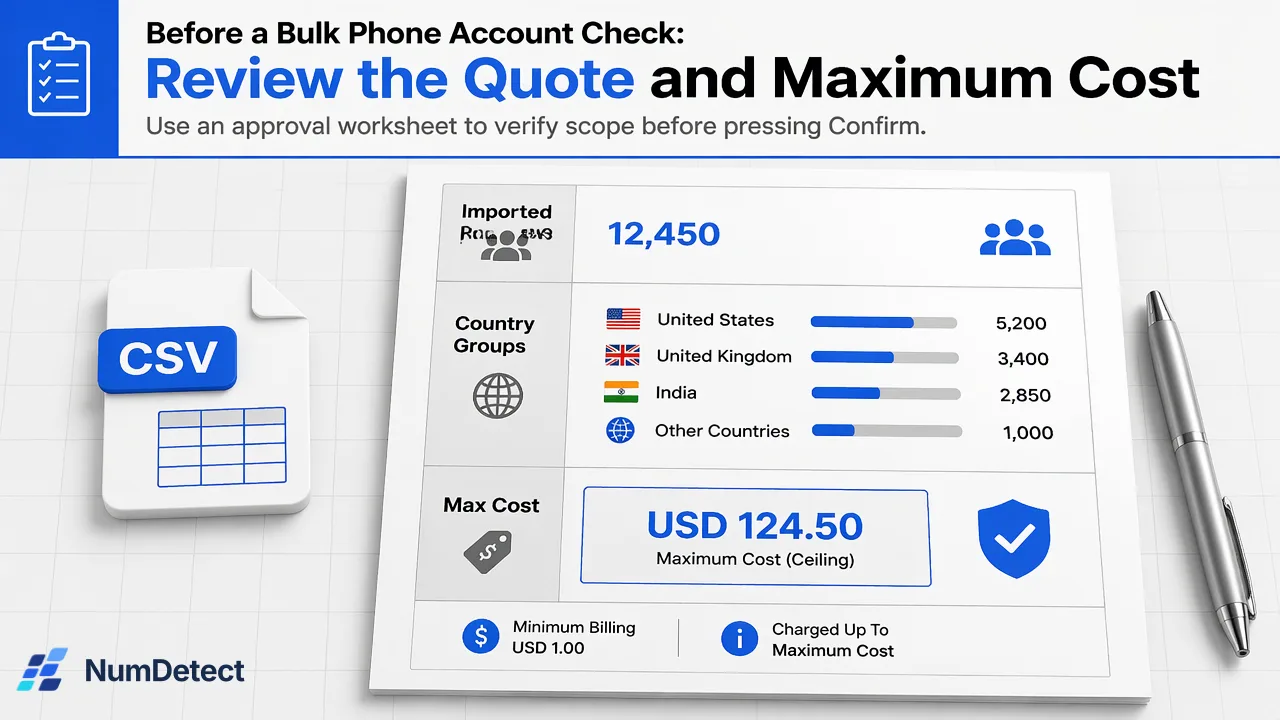
Review list scope, country groups, selected products, bulk minimums and maximum cost before confirming a NumDetect bulk phone account check.
Approve a Live phone-list check only after the imported rows, country and product groups, current price, and maximum cost match the intended job.
Before confirming a bulk phone account check, verify the exact uploaded list, its country groups, the selected account-check products, and the current workspace cost. Set a maximum cost you are willing to authorize and retain the approved scope with the resulting job ID. A public pricing example is useful for orientation, but it cannot price your particular list and product mix.
Define the job the quote is supposed to cover
An operations owner may receive a request such as “check our phone list for messaging accounts.” That is not yet an approval scope. Which import is being checked? Is this the cleaned list or an older export? Which phone account signals will be useful after the results arrive? A quote is meaningful only when it is tied to those answers.
NumDetect supports a single check as well as a bulk upload. For a list job, the current API documentation describes a phone file divided by country and selected product. An international file does not have to be split manually into one file per country. The owner should nevertheless inspect how the imported rows were interpreted, especially numbers without explicit country codes and shared calling-code groups. A country group is processing context, not proof of a person’s residence.
Keep phone and email inputs separate. This article concerns a phone list; adding email account checks would be a different input and job. Likewise, selecting WhatsApp Business answers a Business-account question, while selecting ordinary WhatsApp answers a different registration question. Approve only the products whose individual results support the intended decision. A yes for one product must not be collapsed into a general “reachable” score.
Read the current quote, not a public example
The public pricing page shows example prices and explains that the dashboard shows the exact cost before submission. The current product catalogue provides live price, bulk minimum and country availability for each product. An example based on one product and one quantity cannot account for your imported list’s unique valid rows, country groups and selected products. A small group may still be billable at its product minimum, so multiplying raw rows by a displayed unit price can understate the authorized amount.
For a phone list, treat each supported country-by-product group as a separate pricing unit. The current profile states that its reserved amount uses the greater of valid unique rows and the product’s bulk minimum, multiplied by the bulk unit price. Invalid or duplicate rows do not increase the valid unique count, while an unsupported group reserves nothing. Before approval, inspect the actual quote in the signed-in workspace or current catalogue rather than copying a number from an article. The quote should identify which groups are supported and what amount the job could hold.
In an API workflow, max_cost is the ceiling the owner is willing to pay, expressed in USD micros. The current docs say a job is rejected without charge if its calculated cost exceeds that ceiling or the balance is insufficient. The ceiling is an authorization control, not a prediction that every row will produce a positive account result. A completed group is charged for its reserved group amount even when some individual answers are unknown; negative and unknown signals must be interpreted according to their own result states.
Use an approval worksheet for one real import
The table below is a worksheet, not a price quote. Fill it from the prepared file and current workspace before pressing Confirm.
| Approval field | Record for this job | Why it matters |
|---|---|---|
| Import identity | File name, export date, row count and source owner | Prevents approving the wrong version |
| Input kind | Phone | Keeps email work outside this authorization |
| Country review | Detected groups and any corrected defaults | Shows where the job will run |
| Products | Exact selected phone account checks | Defines the questions and group count |
| Current quote | Workspace amount and pricing time | Captures the price actually considered |
| Maximum cost | Approved ceiling and approver | Stops an over-budget submission |
| Result owner | Person or system that will review the CSV | Ensures the output has a defined use |
Imagine a hypothetical team uploading a mixed-country contact file and selecting WhatsApp plus Telegram. The owner first verifies that the file is the latest consented CRM export, inspects the country groups, and checks that both selected products are currently available for those groups. The owner compares the workspace quote with the approved ceiling. If the team then removes one product, corrects a country default, replaces the file, or deduplicates rows, the old approval no longer describes the same job. Generate and review a fresh quote before submission. This is a planning example, not a tested customer run or a fixed cost calculation.
Record changes that require another decision
Reapprove when the input list, input kind, selected products, country interpretation, available catalogue, or authorized maximum changes. A quote can also become stale if current prices or country support change between planning and submission. Even if the total appears similar, a different product or country group changes the question being asked and the result the team will receive.
Do not use a “looks close enough” comparison between a public illustration and a workspace quote. Ask the owner to name the particular difference. If more rows were added, compare the unique valid count and group minimums again. If a country was corrected, confirm support for the affected product. If an extra platform was selected, confirm that its answer is needed for the team’s downstream decision. If a requested check is unavailable, record that scope reduction explicitly rather than treating an unsupported output as a negative account finding.
After submission, retain the approved worksheet, the job ID returned by the current workflow, and the products and country groups authorized. The API guide describes following a bulk job and retrieving its result file. Store the job ID with the import version so the downloaded CSV can be reconciled with the right approval. The result preserves the original row order and adds per-product columns; review unknown, unsupported, failed and cancelled as distinct states. Do not convert them to no.
Close the loop after the job finishes
A maximum-cost approval is a pre-execution decision. It is not a final interpretation of the output. The current profile explains that completed groups are charged in full, while failed or successfully cancelled groups release their held amount when the job closes. Review the final group states and account history against the original quote, then keep the approved scope, job identifier and result file together for later questions. Do not assume that cancelling a job can recall work already dispatched.
The useful business result is a set of separate account-presence signals attached to the team’s own records. Such signals do not prove identity, account ownership, consent, activity, delivery, or a reply. They should not alone determine a decision with significant effects on a person. Define how each selected platform result will be used before authorizing its cost.
For your next mixed-country phone list, open the current NumDetect API documentation and workspace quote, fill the worksheet with the actual import and selected products, and authorize a maximum cost only after that scope is correct.
Learn More
Choose the product information that fits the next step in your workflow.
Sources
Prepared from NumDetect product documentation and the cited sources.